
Mechanical keyboards have evolved far beyond simple computer peripherals. What was once considered a niche enthusiast hobby has transformed into a rapidly growing hardware engineering ecosystem involving industrial design, embedded systems, PCB engineering, acoustics, firmware development, and advanced manufacturing. Today, custom mechanical keyboards are used by gamers, programmers, designers, engineers, writers, and hardware enthusiasts seeking superior typing experiences, performance, personalization, and ergonomic comfort.
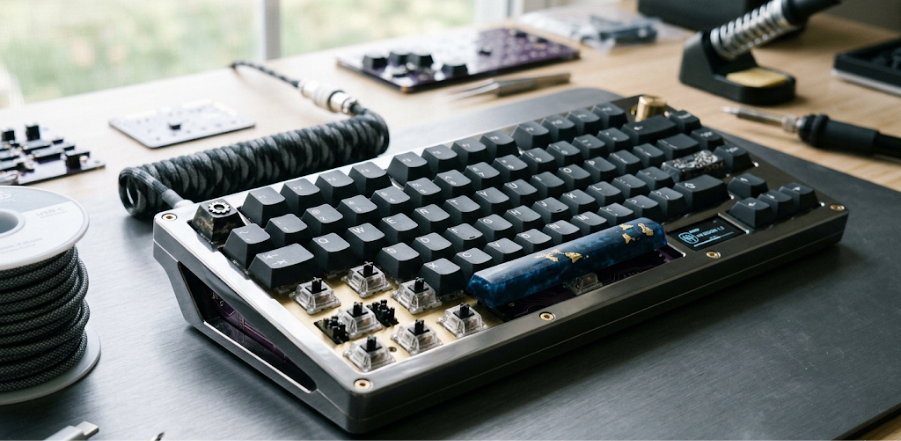
Custom mechanical keyboard hardware design combines electronics engineering with user experience design, allowing creators to build highly optimized input devices tailored for specific workflows, aesthetics, and functional requirements. From compact wireless keyboards and split ergonomic layouts to hot-swappable RGB-enabled enthusiast boards, modern custom keyboard design represents a fascinating intersection of hardware innovation and human-computer interaction.
What Is a Custom Mechanical Keyboard?
A custom mechanical keyboard is a user-designed or engineered keyboard built using:
- Mechanical switches
- Custom PCB layouts
- Programmable firmware
- Personalized hardware components
Unlike traditional membrane keyboards, mechanical keyboards use individual switches for each key, providing:
- Better tactile feedback
- Higher durability
- Faster response times
- Improved typing precision
Custom keyboards allow users to modify nearly every component of the hardware system.
Why Mechanical Keyboards Became Popular
Several factors contributed to the rise of custom keyboard engineering.
1. Typing Experience
Mechanical switches provide:
- Tactile response
- Audible feedback
- Consistent actuation
This creates a more satisfying typing experience compared to membrane keyboards.
2. Durability
Mechanical switches can withstand:
- Tens of millions of key presses
making them highly durable for professional use.
3. Personalization
Users can customize:
- Layouts
- Switches
- Keycaps
- RGB lighting
- Materials
- Firmware behavior
4. Gaming Performance
Mechanical keyboards offer:
- Faster actuation
- Lower latency
- N-key rollover
- Anti-ghosting features
which are important for gaming applications.
5. Ergonomics
Custom layouts can improve:
- Wrist comfort
- Finger movement efficiency
- Long-term typing ergonomics
Core Components of a Custom Mechanical Keyboard
Designing a custom mechanical keyboard involves multiple hardware subsystems.
1. Keyboard PCB (Printed Circuit Board)
The PCB is the central electronics platform of the keyboard.
It connects:
- Switches
- Microcontroller
- LEDs
- USB interface
- Wireless modules
The PCB controls:
- Key scanning
- Signal processing
- Firmware execution
PCB Design Considerations
Important design factors include:
- Matrix layout optimization
- Trace routing
- Power distribution
- ESD protection
- Signal integrity
- RGB circuitry
Popular PCB design tools include:
- KiCad
- Altium Designer
- Eagle PCB
2. Mechanical Switches
Switches are the heart of the keyboard experience.
Each switch contains:
- Spring mechanism
- Stem
- Electrical contact system
Types of Mechanical Switches
| Type | Characteristics |
| Linear | Smooth keystroke |
| Tactile | Noticeable bump feedback |
| Clicky | Audible click feedback |
Switch Parameters
Important switch specifications include:
- Actuation force
- Travel distance
- Actuation point
- Sound profile
- Durability
Hot-Swappable Switch Design
Modern custom keyboards often support:
- Hot-swappable sockets
This allows users to replace switches without soldering.
Advantages:
- Easy customization
- Simplified maintenance
- Switch experimentation
3. Microcontroller Unit (MCU)
The MCU controls keyboard logic and communication.
Popular microcontroller families include:
- ARM Cortex-M
- AVR-based controllers
- ESP32 for wireless keyboards
MCU Responsibilities
The controller handles:
- Key matrix scanning
- USB communication
- Bluetooth connectivity
- RGB lighting control
- Macro processing
- Firmware execution
4. Keyboard Matrix Design
Keyboards use matrix circuits to reduce wiring complexity.
A keyboard matrix organizes keys into:
- Rows
- Columns
The MCU scans the matrix continuously to detect key presses.
Matrix Engineering Challenges
Designers must address:
- Ghosting
- Key rollover
- Debouncing
- Signal timing
5. Firmware Development
Firmware is a critical part of custom keyboard engineering.
Firmware controls:
- Key mapping
- Macros
- RGB effects
- Wireless behavior
- Layer switching
Popular Firmware Platforms
Widely used keyboard firmware systems include:
- QMK
- VIA
- ZMK
These platforms enable highly customizable keyboard functionality.
6. Keycaps
Keycaps affect:
- Typing feel
- Acoustics
- Aesthetics
Common Keycap Materials
| Material | Characteristics |
| ABS | Smooth and lightweight |
| PBT | Durable and textured |
| Polycarbonate | Transparent RGB support |
Keycap Profiles
Profiles determine typing ergonomics.
Popular profiles include:
- OEM
- Cherry
- SA
- DSA
- XDA
7. Keyboard Case Design
The case provides:
- Structural support
- Acoustic characteristics
- Visual aesthetics
Common Case Materials
| Material | Advantages |
| Aluminum | Premium feel and durability |
| Acrylic | RGB visibility |
| Plastic | Lightweight and affordable |
| Wood | Unique aesthetics |
CNC Machining in Keyboard Design
High-end keyboards often use:
- CNC-machined aluminum cases
Benefits include:
- Precision manufacturing
- Better rigidity
- Premium acoustics
8. Plate Design
The keyboard plate sits between:
- Switches
- PCB
The plate influences:
- Typing stiffness
- Sound profile
- Structural stability
Plate Materials
| Material | Typing Feel |
| Aluminum | Firm |
| Brass | Heavy and rigid |
| Polycarbonate | Softer |
| FR4 | Balanced flexibility |
RGB Lighting Systems
Modern keyboards often feature:
- Per-key RGB lighting
- Underglow lighting
- Reactive effects
RGB systems require:
- LED drivers
- Power optimization
- Firmware synchronization
Wireless Mechanical Keyboards
Wireless designs increasingly use:
- Bluetooth Low Energy (BLE)
- 2.4 GHz wireless systems
Wireless Design Challenges
Engineers must optimize:
- Battery life
- Latency
- Signal reliability
- Power management
Battery Systems
Wireless keyboards require efficient battery architecture.
Common battery solutions include:
- Lithium-ion batteries
- Lithium-polymer batteries
Power optimization is critical for:
- Long standby time
- RGB efficiency
- Wireless stability
Ergonomic Keyboard Design
Ergonomics is becoming increasingly important.
Popular ergonomic approaches include:
- Split keyboards
- Columnar layouts
- Tented designs
- Ortholinear arrangements
These layouts reduce:
- Wrist strain
- Finger travel
- Repetitive stress
Acoustic Engineering in Keyboards
Sound has become a major design focus in enthusiast keyboards.
Engineers tune acoustics using:
- Foam dampening
- Gasket mounting
- Silicone pads
- Plate materials
- Case geometry
Typing sound profiles may range from:
- Deep “thock”
- Soft muted tones
- Sharp tactile clicks
Mounting Styles
The mounting system affects:
- Typing feel
- Sound characteristics
- Flexibility
Common Mounting Methods
| Mount Type | Characteristics |
| Tray Mount | Simple and affordable |
| Top Mount | Firm typing feel |
| Gasket Mount | Softer and cushioned |
| Sandwich Mount | Balanced rigidity |
USB Interface Design
Most keyboards use USB connectivity.
Important USB considerations include:
- USB-C integration
- ESD protection
- Data signal stability
- Power delivery
Security Features
Advanced keyboards may include:
- Encrypted wireless communication
- Secure firmware updates
- Anti-keylogging protections
Security is especially important in enterprise environments.
Manufacturing Process
Custom keyboard production involves:
- PCB fabrication
- CNC machining
- Injection molding
- Surface finishing
- Assembly
- Quality testing
Quality Assurance
Keyboard hardware testing includes:
- Switch testing
- Latency validation
- RGB verification
- Wireless stability testing
- Durability analysis
Challenges in Custom Keyboard Hardware Design
Despite growing popularity, keyboard engineering involves many challenges.
1. Signal Integrity
High-speed USB and RGB systems require careful PCB routing.
2. Power Management
Wireless keyboards require extremely efficient energy optimization.
3. Firmware Complexity
Advanced features increase firmware development complexity.
4. Acoustic Tuning
Achieving desired sound profiles requires significant experimentation.
5. Manufacturing Tolerances
Precision machining and assembly are critical for consistent typing feel.
Future Trends in Mechanical Keyboard Design
Several technologies are shaping the future of keyboard hardware.
AI-Powered Keyboards
Future systems may support:
- Typing prediction
- Adaptive layouts
- Intelligent macros
- Personalized ergonomics
Hall Effect Keyboards
Hall effect switches use magnetic sensing instead of physical contacts.
Advantages:
- Adjustable actuation
- Higher durability
- Analog input capability
Optical Switch Technology
Optical switches use light sensors for actuation.
Benefits include:
- Faster response times
- Reduced wear
- Lower debounce delay
Smart Ergonomics
Future keyboards may dynamically adapt to:
- Hand positioning
- Typing patterns
- Fatigue levels
Sustainable Materials
Manufacturers are increasingly exploring:
- Recycled plastics
- Eco-friendly packaging
- Sustainable manufacturing methods
Custom Mechanical Keyboards in Professional Environments
Custom keyboards are increasingly used in:
- Software development
- Creative design
- Gaming
- Financial trading
- Engineering workstations
because of their:
- Comfort
- Reliability
- Productivity benefits
Educational Value of Keyboard Engineering
Custom keyboard design is an excellent educational platform for learning:
- PCB design
- Embedded systems
- USB protocols
- Firmware engineering
- Industrial design
- Manufacturing processes
It combines multiple engineering disciplines into a highly practical hardware project.
Final Thoughts
Custom mechanical keyboard hardware design represents one of the most fascinating intersections of electronics engineering, industrial design, firmware development, ergonomics, and user experience optimization. What began as a niche enthusiast hobby has evolved into a sophisticated engineering field focused on creating highly personalized, high-performance input devices.
As computing continues evolving, keyboards remain one of the most important interfaces between humans and machines. Advances in wireless technology, smart ergonomics, AI-assisted input systems, and innovative switch mechanisms will continue pushing the boundaries of keyboard hardware engineering.
The future of custom keyboards is not simply about typing faster — it is about designing intelligent, comfortable, and highly optimized human-machine interaction systems tailored for the digital age.
