
The concept of smart homes has evolved rapidly over the past decade. What was once considered a luxury reserved for technology enthusiasts is now becoming accessible to homeowners worldwide. Smart lighting, automated climate control, intelligent security systems, voice-controlled appliances, and connected sensors are transforming how people interact with their living spaces.
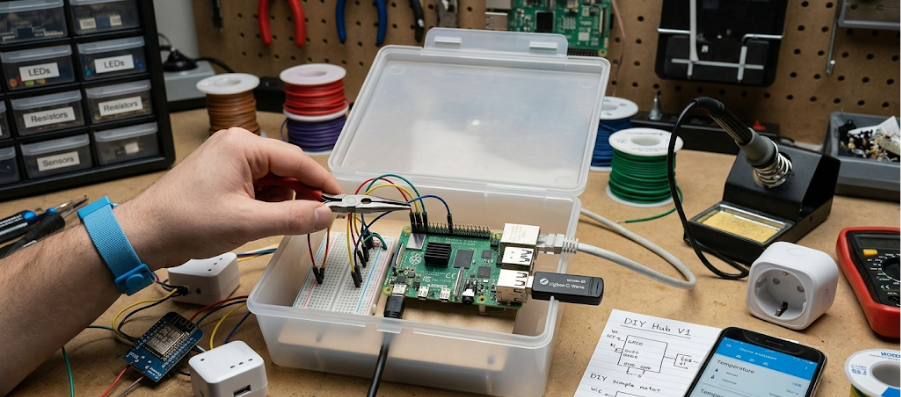
However, many commercial smart home solutions require expensive hardware, subscription services, or vendor-specific ecosystems that limit flexibility and increase costs. A low-cost home automation hub provides an affordable alternative, allowing users to connect, monitor, and control multiple smart devices from a centralized platform without significant investment.
Building a low-cost home automation hub is an excellent project for hobbyists, students, IoT developers, and homeowners who want to explore smart home technology while maintaining full control over their hardware and data.
What Is a Home Automation Hub?
A home automation hub acts as the central controller for smart devices within a home network.
The hub communicates with various devices such as:
- Smart lights
- Motion sensors
- Smart plugs
- Door sensors
- Cameras
- Thermostats
- Environmental sensors
It enables users to:
- Monitor devices
- Automate tasks
- Create schedules
- Receive alerts
- Manage connected systems from a single interface
Without a hub, devices often operate independently and require separate applications for management.
Benefits of a Home Automation Hub
Building a centralized hub offers several advantages.
Unified Device Management
Control multiple smart devices from one dashboard instead of using different mobile applications.
Cost Savings
A DIY hub can be significantly cheaper than commercial smart home controllers.
Customization
Users can create automation rules tailored to their specific needs.
Data Privacy
Local processing reduces dependence on cloud services and enhances privacy.
Scalability
New devices and sensors can be added as requirements grow.
Essential Features of a Home Automation Hub
A practical home automation hub should provide:
- Device discovery
- Sensor monitoring
- Automation scheduling
- Real-time notifications
- Mobile access
- Local data storage
- Energy monitoring
- Security controls
These features create a flexible and efficient smart home ecosystem.
Hardware Requirements
One of the reasons home automation is becoming more accessible is the availability of inexpensive development boards and sensors.
Central Processing Unit
The hub requires a small computing platform to manage connected devices.
Popular options include:
Single Board Computers
Examples:
- Raspberry Pi
- Orange Pi
- Banana Pi
Advantages:
- Low cost
- Low power consumption
- Large community support
Microcontroller-Based Systems
Examples:
- ESP32
- ESP8266
Advantages:
- Extremely affordable
- Wireless connectivity
- Low energy usage
For larger home automation systems, a single-board computer is generally preferred due to its greater processing capability.
Wireless Communication Modules
Smart devices use various communication protocols.
The hub should support one or more of the following:
Wi-Fi
Used by:
- Smart plugs
- Cameras
- Smart bulbs
Bluetooth Low Energy (BLE)
Used for:
- Wearables
- Sensors
- Proximity devices
Zigbee
Common in:
- Smart lighting
- Home automation sensors
Z-Wave
Popular in:
- Security systems
- Smart locks
LoRa
Suitable for:
- Long-range sensor networks
Multi-protocol support increases compatibility with different smart devices.
Power Supply Design
A reliable power system is critical.
Considerations include:
- Stable voltage regulation
- Surge protection
- Backup power options
- Efficient power consumption
Adding an uninterruptible power supply (UPS) can help maintain operation during power outages.
Sensor Integration
Sensors provide the data necessary for automation.
Common sensor types include:
Temperature Sensors
Monitor indoor climate conditions.
Humidity Sensors
Track moisture levels for comfort and air quality.
Motion Sensors
Detect occupancy and movement.
Door and Window Sensors
Provide security and access monitoring.
Light Sensors
Measure ambient lighting conditions.
Air Quality Sensors
Monitor:
- CO₂ levels
- Particulate matter
- Volatile organic compounds
Smart Device Integration
The hub should support various connected devices.
Examples include:
Smart Lights
Enable:
- Remote control
- Scheduling
- Brightness adjustment
Smart Plugs
Allow automation of traditional appliances.
Smart Switches
Replace conventional wall switches with programmable alternatives.
Smart Locks
Provide remote access control and monitoring.
Smart Thermostats
Optimize heating and cooling systems.
Software Architecture
The software layer manages communication between devices and users.
A typical architecture includes:
Device Layer
Connected sensors and smart devices.
Communication Layer
Handles wireless protocols and messaging.
Automation Engine
Processes automation rules and triggers.
Database Layer
Stores sensor readings and event history.
User Interface
Provides dashboards and control panels.
Automation Rules
Automation is the core functionality of a smart home.
Examples include:
Lighting Automation
If:
- Motion detected
Then:
- Turn on hallway lights
Climate Control
If:
- Room temperature exceeds threshold
Then:
- Activate cooling system
Security Monitoring
If:
- Door opens while away
Then:
- Send mobile alert
Automation rules reduce manual intervention and improve convenience.
Mobile and Web Dashboards
Users need a simple way to interact with the hub.
Dashboards typically display:
- Device status
- Sensor readings
- Energy consumption
- Security alerts
- Automation settings
A responsive interface allows access from:
- Smartphones
- Tablets
- Laptops
Local vs Cloud Processing
Local Processing
Advantages:
- Faster response times
- Better privacy
- Reduced internet dependency
Cloud Processing
Advantages:
- Remote accessibility
- Advanced analytics
- Easier integration
A hybrid model often provides the best balance between functionality and privacy.
Security Considerations
Home automation systems must be protected from cyber threats.
Important measures include:
Strong Authentication
Use secure passwords and multi-factor authentication.
Device Encryption
Protect communications between devices and the hub.
Secure Firmware Updates
Regularly patch vulnerabilities.
Network Segmentation
Separate smart home devices from critical personal systems.
Access Logging
Maintain records of device activities and login attempts.
Energy Monitoring and Optimization
A smart hub can help reduce electricity consumption.
Features include:
- Appliance usage tracking
- Peak load monitoring
- Energy reports
- Automated power-saving schedules
Examples:
- Turning off unused devices
- Optimizing HVAC operation
- Controlling outdoor lighting
Voice Control Integration
Voice control enhances convenience.
The hub can support:
- Lighting commands
- Climate adjustments
- Device status queries
- Routine activation
Voice interaction simplifies home automation for all users.
Remote Monitoring
Remote access allows homeowners to:
- View camera feeds
- Check sensor status
- Receive alerts
- Control devices from anywhere
This capability is especially useful for:
- Vacation homes
- Rental properties
- Elderly care monitoring
Advanced Features
As the system grows, additional capabilities can be added.
Predictive Automation
Analyze user behavior and automatically optimize routines.
AI-Based Energy Management
Reduce energy consumption through intelligent scheduling.
Smart Occupancy Detection
Combine multiple sensors to determine room usage accurately.
Environmental Analytics
Track long-term trends in:
- Temperature
- Air quality
- Humidity
Automated Maintenance Alerts
Notify users when sensors require attention or batteries need replacement.
Challenges in DIY Home Automation
Despite its advantages, building a home automation hub presents challenges.
Device Compatibility
Different vendors use different protocols and standards.
Network Reliability
Wireless communication may be affected by interference.
Security Risks
Improper configuration can expose devices to threats.
Scalability
Large deployments require careful planning and management.
Maintenance
Regular updates and troubleshooting are necessary.
Future of Home Automation Hubs
Emerging technologies will continue improving home automation systems.
Future hubs may include:
- AI-driven automation
- Edge computing
- Advanced energy optimization
- Predictive maintenance
- Enhanced security analytics
- Digital twin home models
As smart devices become more affordable, home automation hubs will become increasingly important for managing connected living environments.
Educational Value
Building a low-cost home automation hub provides practical experience in:
- Embedded systems
- IoT development
- Networking
- Wireless communication
- Sensor integration
- Cloud computing
- Cybersecurity
It serves as an excellent project for students, makers, and aspiring hardware engineers.
Conclusion
A low-cost home automation hub offers an affordable and flexible way to create a smart home ecosystem without relying on expensive commercial platforms. By combining inexpensive hardware, wireless communication technologies, sensors, and automation software, users can build a centralized system that improves convenience, security, energy efficiency, and overall quality of life.
As smart home technologies continue to evolve, DIY automation hubs will remain an attractive solution for individuals seeking greater control, customization, and privacy. Building such a system is not only a rewarding engineering project but also a practical step toward creating an intelligent and connected living environment.
