
PCB traces may look like simple copper connections between electronic components. However, when signals become fast enough, a trace behaves differently from an ordinary wire.
At high frequencies and fast edge rates, the trace acts as a transmission line. Its width, thickness, length, dielectric material, and reference plane can all affect how a signal travels.
Understanding transmission lines is essential for designing reliable high-speed PCBs. It helps engineers manage impedance, reflections, signal loss, crosstalk, and signal integrity.
In this article, we explain how transmission lines work on a PCB and discuss the key design factors that affect their performance.
What Is a Transmission Line?
A transmission line is a conductive path designed to carry electrical signals while maintaining predictable electrical characteristics.
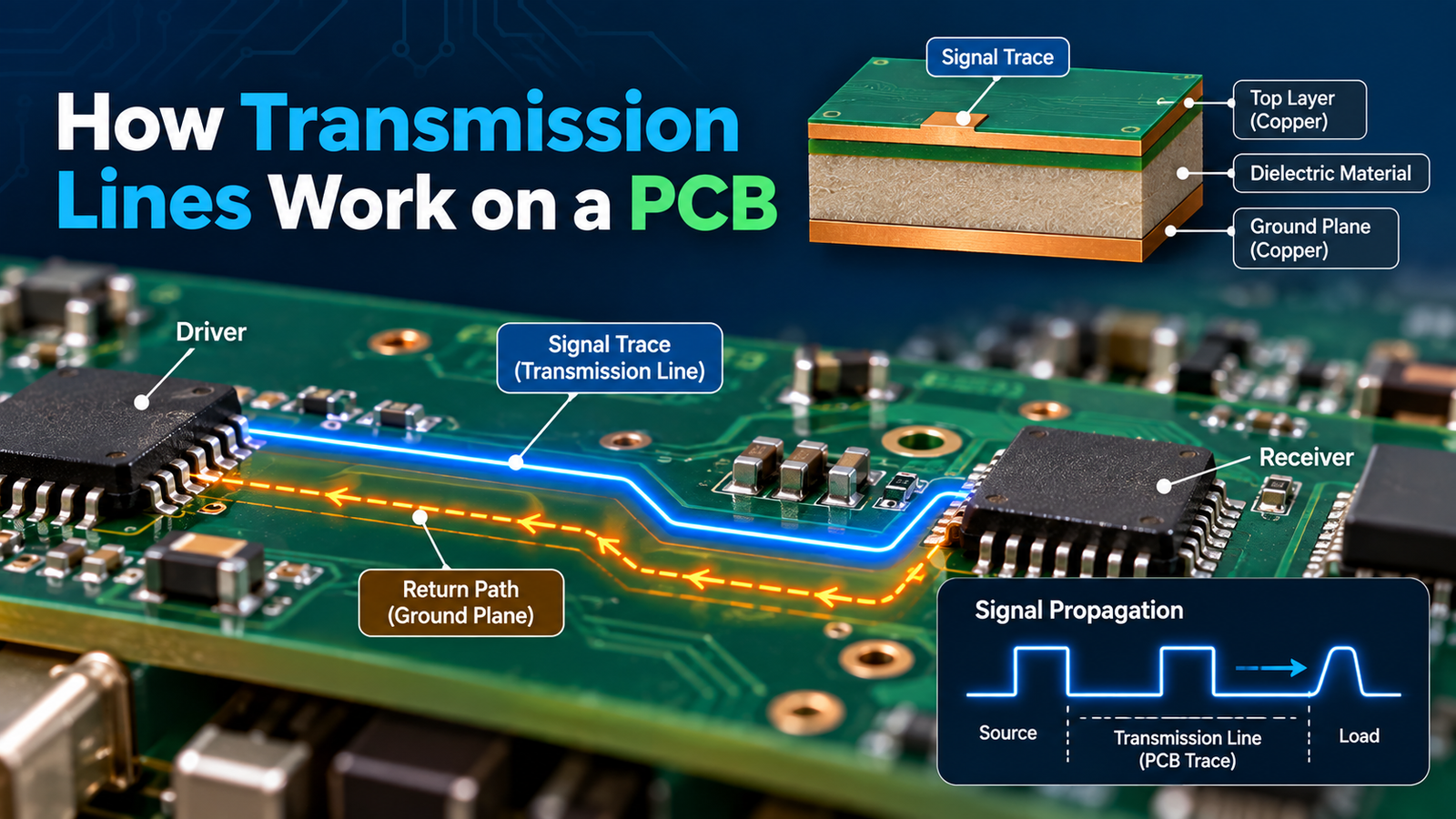
On a PCB, a transmission line usually consists of:
- A copper signal trace
- A reference plane
- A dielectric material between them
A common PCB transmission-line structure looks like this:
Signal Trace
↓
Dielectric Material
↓
Ground Plane
The signal travels along the trace while the return current follows a corresponding path through the reference plane.
Together, the trace and its return path form the transmission-line structure.
Why Do PCB Traces Behave Like Transmission Lines?
At low speeds, engineers can often treat a PCB trace as a simple electrical connection.
However, faster signals behave differently.
The important factor is not only the clock frequency. Signal rise time and fall time also determine when transmission-line effects become important.
When a signal changes quickly, the electrical effect does not appear across the entire trace at the same time. Instead, the signal propagates along the trace.
As a result, a long PCB trace can introduce:
- Signal delay
- Reflections
- Impedance changes
- Ringing
- Overshoot
- Undershoot
- Signal distortion
Therefore, high-speed PCB traces should be designed as controlled transmission lines rather than ordinary wires.
How a Signal Travels Along a PCB Trace
When a driver sends a signal into a PCB trace, an electromagnetic field develops around the trace and its return path.
The signal then propagates from the source toward the receiver.
A simplified path looks like this:
Driver → PCB Trace → Receiver
At the same time, the return current follows a path through the reference plane.
This creates an electromagnetic structure around the signal path.
The quality of this complete path determines how accurately the receiver sees the transmitted signal.
For this reason, PCB designers must consider both the signal trace and its return path.
What Is Characteristic Impedance?
One of the most important properties of a PCB transmission line is characteristic impedance.
Characteristic impedance describes how the transmission line responds to a traveling signal.
Common impedance values include:
- 50 Ω
- 75 Ω
- 90 Ω
- 100 Ω
The required value depends on the interface and circuit design.
For example, many single-ended high-speed signals use a 50 Ω target. Differential interfaces may use a specified differential impedance based on the interface requirements.
Maintaining the required impedance helps reduce signal reflections and preserve signal quality.
What Determines PCB Trace Impedance?
Several physical factors influence transmission-line impedance.
1. Trace Width
A wider trace generally changes the characteristic impedance of the transmission line.
Therefore, designers must select trace width based on the required impedance and PCB stackup.
2. Dielectric Thickness
The distance between the signal trace and its reference plane also affects impedance.
A smaller distance changes the electromagnetic relationship between the trace and plane.
3. Dielectric Material
PCB materials have different dielectric properties.
The dielectric constant affects how signals propagate through the PCB.
4. Copper Thickness
Copper thickness affects the physical geometry of the trace and can influence impedance.
5. Trace Structure
Microstrip and stripline structures have different electromagnetic environments.
For this reason, impedance calculations should consider the complete PCB stackup rather than trace width alone.
Microstrip Transmission Lines
A microstrip is a transmission line where the signal trace sits on an outer PCB layer above a reference plane.
A simplified structure is:
Signal Trace
↓
Dielectric
↓
Ground Plane
Microstrip structures are common because they are relatively straightforward to manufacture and route.
They can be useful for:
- High-speed digital signals
- RF signals
- Antenna connections
- Communication interfaces
However, the surrounding environment can affect the electromagnetic field because part of the field exists outside the dielectric.
Stripline Transmission Lines
A stripline places the signal trace between reference planes.
A simplified structure is:
Ground Plane
↓
Dielectric
↓
Signal Trace
↓
Dielectric
↓
Ground Plane
This structure provides a more enclosed electromagnetic environment.
As a result, stripline routing can offer strong control over signal behavior and electromagnetic coupling.
Designers may use stripline structures when the application requires controlled impedance and reduced electromagnetic interaction.
Why the Return Path Matters
A signal does not travel through the signal trace alone.
Its current also needs a return path.
For a signal routed over a continuous ground plane, the return current generally follows a path close to the signal trace.
A simple structure is:
Signal Trace → Receiver
Ground Plane → Return Path
If the reference plane contains a gap, slot, or other discontinuity, the return current may need to travel around the interruption.
This longer return path can increase loop area and affect signal integrity.
Therefore, designers should keep high-speed traces over suitable and continuous reference planes whenever possible.
What Happens When Impedance Changes?
Suppose a signal travels through a transmission line with a controlled impedance.
If the trace suddenly encounters a different impedance, part of the signal energy can reflect toward the source.
This can happen because of:
- Incorrect trace width
- Connector transitions
- Via structures
- Layer changes
- Poor termination
- Reference-plane discontinuities
The result may include:
- Ringing
- Overshoot
- Undershoot
- Timing errors
- Reduced signal quality
Keeping the transmission-line geometry consistent can help minimize these effects.
Understanding Signal Reflections
Signal reflection occurs when a traveling signal encounters an impedance discontinuity.
A simplified example is:
Driver → Transmission Line → Impedance Discontinuity → Receiver
Part of the signal continues toward the receiver.
Another portion can travel back toward the driver.
The severity of the reflection depends on the impedance difference and the characteristics of the signal.
In high-speed designs, even relatively small discontinuities can affect signal quality.
For this reason, PCB designers pay close attention to trace geometry, vias, connectors, and termination.
Why Trace Length Matters
Signal propagation takes time.
As a result, a longer PCB trace creates greater propagation delay.
For slower signals, this delay may not matter.
However, high-speed systems often have tight timing requirements.
A long trace can also become electrically significant when compared with the signal’s rise time.
Therefore, designers should consider both physical trace length and signal edge speed when evaluating transmission-line effects.
PCB Transmission Lines and Crosstalk
Crosstalk occurs when energy from one signal affects a nearby signal.
Transmission lines can couple through their electromagnetic fields.
For example:
Aggressor Trace → Electromagnetic Coupling → Victim Trace
Crosstalk can increase when traces are:
- Too close together
- Routed in parallel for long distances
- Carrying fast signals
- Located without a suitable reference structure
Designers can reduce crosstalk by:
- Increasing trace spacing
- Reducing long parallel routing
- Maintaining a continuous reference plane
- Using appropriate layer arrangements
Good PCB routing practices can therefore improve both signal integrity and electromagnetic compatibility.
Differential Transmission Lines
Some high-speed interfaces use differential signaling.
A differential pair contains two traces that carry related signals.
A simplified structure is:
Positive Signal →
Negative Signal →
The receiver evaluates the voltage difference between the two signals.
Differential routing can provide strong noise rejection when the pair maintains proper balance.
Important design factors include:
- Trace spacing
- Trace width
- Pair length
- Reference plane
- Via structure
- Impedance
Maintaining consistent geometry helps the two traces behave similarly throughout the signal path.
Transmission Lines and PCB Vias
Vias allow signals to move between PCB layers.
However, a via changes the physical structure of the transmission line.
A layer transition can introduce:
- Impedance discontinuity
- Parasitic capacitance
- Parasitic inductance
- Via-stub effects
- Additional signal loss
Therefore, high-speed signals should use carefully designed via transitions.
Shorter via structures and suitable return paths can help maintain signal quality during layer changes.
PCB Stackup and Transmission-Line Performance
The PCB stackup defines the physical relationship between signal layers, dielectric materials, and reference planes.
A typical multilayer PCB may contain:
Top Signal Layer
↓
Dielectric
↓
Ground Plane
↓
Dielectric
↓
Power Plane
↓
Dielectric
↓
Bottom Signal Layer
The stackup affects:
- Characteristic impedance
- Signal propagation
- Crosstalk
- EMI
- Return paths
- Trace geometry
Therefore, PCB stackup design should happen before finalizing controlled-impedance routing.
How to Design a Controlled-Impedance Transmission Line
A practical design process can follow these steps:
Step 1: Identify the Interface Requirements
Determine the required impedance and signal characteristics.
Step 2: Define the PCB Stackup
Choose the number of layers, dielectric thickness, copper thickness, and reference planes.
Step 3: Calculate Trace Dimensions
Determine the required trace width and spacing.
Step 4: Route the Signal
Keep the transmission-line geometry consistent.
Step 5: Protect the Return Path
Avoid unnecessary reference-plane gaps and discontinuities.
Step 6: Review Vias and Connectors
Check every transition in the signal path.
Step 7: Simulate When Necessary
Use signal-integrity analysis for demanding high-speed designs.
Step 8: Validate the Prototype
Test the PCB under realistic operating conditions.
Following this process can reduce signal-integrity problems before production.
Common PCB Transmission-Line Design Mistakes
Several mistakes can affect transmission-line performance.
Ignoring the Return Path
A signal trace without a suitable return path can create a larger current loop.
Changing Trace Width Without Planning
Unexpected geometry changes can create impedance discontinuities.
Routing Over a Plane Gap
A reference-plane gap can interrupt the expected return-current path.
Using Excessive Via Stubs
Long via stubs can affect high-speed signals.
Routing High-Speed Traces Too Close Together
Close spacing can increase crosstalk.
Ignoring Connectors
A connector can create an impedance transition in an otherwise controlled signal path.
Failing to Consider Rise Time
Clock frequency alone does not determine whether transmission-line effects matter.
Avoiding these mistakes can make high-speed PCB designs more predictable and reliable.
Best Practices for PCB Transmission Lines
Engineers can improve transmission-line performance by following these practices:
- Define the required impedance before routing.
- Use a controlled PCB stackup.
- Maintain consistent trace geometry.
- Provide a continuous reference plane.
- Keep high-speed traces away from plane gaps.
- Control spacing between adjacent signal traces.
- Minimize unnecessary vias and layer transitions.
- Maintain symmetry in differential pairs.
- Consider connectors and packages as part of the signal path.
- Use simulation and testing for demanding applications.
Applications That Use PCB Transmission Lines
Transmission-line design is important in many modern electronic systems.
Examples include:
- High-speed computing hardware
- Networking equipment
- Telecommunications systems
- Automotive electronics
- IoT devices
- Industrial control systems
- RF equipment
- Wireless communication devices
- Embedded systems
- Data-processing hardware
As data rates increase, transmission-line behavior becomes increasingly important.
Conclusion
A PCB trace may look like a simple copper connection, but fast signals can make it behave like a transmission line.
Trace width, dielectric thickness, PCB material, reference planes, trace length, vias, connectors, and return paths all influence transmission-line performance.
Good transmission-line design focuses on maintaining predictable impedance and providing a clear signal and return path.
The basic design approach is:
Signal Source → Controlled Transmission Line → Receiver
When engineers carefully control the complete signal path, they can reduce reflections, crosstalk, signal distortion, and other signal-integrity problems.
Understanding transmission lines is therefore an important part of designing reliable high-speed PCBs.
