
The popularity of retro gaming has surged in recent years as enthusiasts seek to relive classic gaming experiences from the 1980s, 1990s, and early 2000s. While original gaming consoles are becoming increasingly rare and expensive, modern Single Board Computers (SBCs) provide an affordable and flexible way to recreate vintage gaming systems. By combining compact computing hardware, emulation software, storage devices, and custom enclosures, hobbyists can build powerful retro gaming consoles capable of running thousands of classic games from multiple generations.
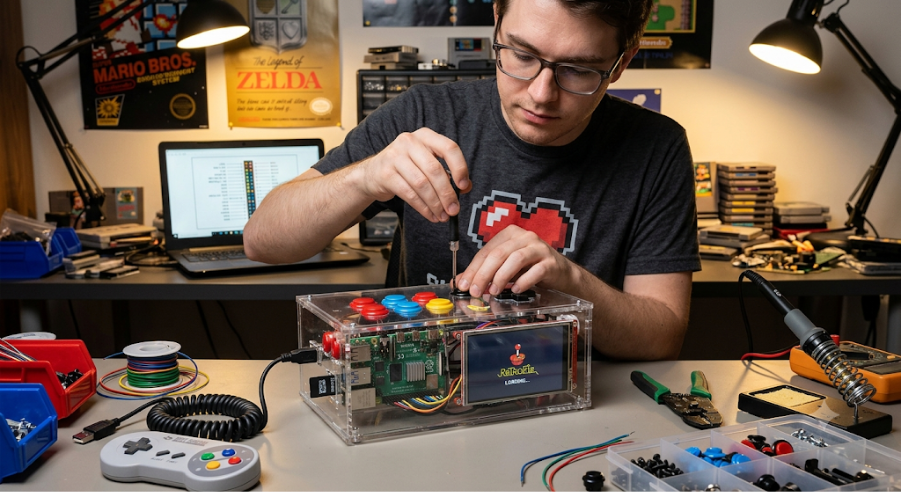
Creating a retro gaming console from SBCs is an exciting project that combines computer hardware, embedded systems, software configuration, electronics integration, and gaming nostalgia. It offers a practical introduction to system design while providing a versatile entertainment platform.
What Is a Retro Gaming Console?
A retro gaming console is a system designed to play classic video games originally released on older gaming platforms.
These games may come from systems such as:
- 8-bit home consoles
- 16-bit gaming systems
- Arcade machines
- Handheld gaming devices
- Early 3D gaming platforms
Modern retro consoles use software emulation to reproduce the behavior of original hardware, allowing classic games to run on contemporary computing platforms.
Why Use Single Board Computers?
Single Board Computers integrate essential computing components onto a single compact circuit board.
An SBC typically includes:
- Processor
- Memory
- Graphics subsystem
- Storage interfaces
- USB ports
- Networking capabilities
Advantages include:
- Low cost
- Small size
- Low power consumption
- Easy customization
- Strong community support
These characteristics make SBCs ideal for retro gaming projects.
Benefits of Building Your Own Retro Console
Creating a custom retro gaming console offers several advantages.
Cost Efficiency
Building a console is often less expensive than purchasing original hardware.
Multi-System Support
One device can emulate numerous gaming platforms.
Customization
Users can personalize:
- Appearance
- Controls
- User interface
- Storage capacity
Educational Value
The project teaches:
- Computer hardware
- Embedded systems
- Operating systems
- Gaming emulation
Compact Design
A single device can replace multiple vintage consoles.
Planning the Project
Successful console design begins with defining project goals.
Questions to consider include:
- Which gaming systems will be emulated?
- Will the console support multiplayer gaming?
- Is portability required?
- Will wireless controllers be used?
- How much storage is needed?
Clear requirements simplify hardware selection and system design.
Selecting the SBC
The Single Board Computer acts as the heart of the console.
Important factors include:
Processing Power
The processor determines which gaming systems can be emulated smoothly.
More demanding platforms require:
- Higher clock speeds
- Multiple CPU cores
- Improved graphics capabilities
Graphics Performance
Graphics hardware affects:
- Frame rates
- Resolution scaling
- Visual enhancements
Memory Capacity
Additional RAM improves:
- Emulator performance
- User interface responsiveness
- Multitasking capabilities
Connectivity
Useful interfaces include:
- HDMI
- USB
- Ethernet
- Wi-Fi
- Bluetooth
Storage System Design
Retro gaming systems require storage for:
- Operating system
- Emulator software
- Game libraries
- Save files
Flash Storage
Flash-based storage offers:
- Fast boot times
- Low power consumption
- Silent operation
Suitable for most retro gaming systems.
External Storage Expansion
Additional storage may be required for:
- Large game collections
- Multimedia content
- Backup files
External drives provide scalable capacity.
Choosing an Operating System
The operating system provides the foundation for gaming functionality.
Key requirements include:
- Emulator support
- User-friendly interface
- Hardware compatibility
- Controller support
The operating system should simplify navigation and game management.
Understanding Emulation
Emulation software recreates the behavior of original gaming hardware.
The emulator translates:
- CPU instructions
- Graphics operations
- Audio processing
- Input controls
into commands that can run on modern hardware.
Components of an Emulator
A typical emulator includes:
CPU Emulation
Simulates the original processor.
Graphics Rendering
Recreates video output.
Audio Processing
Generates original game sounds and music.
Input Mapping
Converts controller signals into game actions.
User Interface Design
A retro console should provide an intuitive user experience.
Common interface features include:
- Game library browsing
- Search functionality
- Favorites lists
- Game metadata
- Artwork display
An attractive interface enhances the overall gaming experience.
Controller Integration
Gaming controls are critical to usability.
USB Controllers
Advantages:
- Simple setup
- Reliable performance
- Broad compatibility
Wireless Controllers
Benefits include:
- Improved convenience
- Reduced cable clutter
- Flexible gameplay positions
Wireless systems may use:
- Bluetooth
- Proprietary radio protocols
Arcade Control Panels
For arcade-style gaming, custom control panels can include:
- Joysticks
- Push buttons
- Trackballs
- Spinner controls
These provide an authentic gaming experience.
Video Output Design
Modern displays typically use digital video connections.
Important considerations include:
Resolution Support
The console may support:
- Native retro resolutions
- High-definition output
- Upscaling technologies
Refresh Rate
Smooth gameplay depends on proper frame synchronization.
Display Compatibility
The system should function with:
- Monitors
- Televisions
- Projectors
Audio System Design
Audio is an essential part of classic gaming.
The console should support:
- Stereo output
- Headphone connections
- External speaker systems
Good audio reproduction enhances immersion and nostalgia.
Power Supply Requirements
The console requires a stable power source.
Key design goals include:
- Voltage regulation
- Overcurrent protection
- Energy efficiency
Power requirements vary depending on:
- SBC performance
- Storage devices
- Connected peripherals
Cooling and Thermal Management
Even compact gaming systems generate heat.
Cooling methods include:
Passive Cooling
Uses:
- Heat sinks
- Metal enclosures
Advantages:
- Silent operation
- Lower maintenance
Active Cooling
Uses:
- Cooling fans
- Airflow channels
Benefits:
- Better temperature control
- Improved performance stability
Designing a Custom Enclosure
The enclosure protects internal components while defining the console’s appearance.
Design Objectives
A good enclosure should provide:
- Structural strength
- Adequate ventilation
- Easy maintenance access
- Attractive aesthetics
Materials
Common enclosure materials include:
Plastic
Advantages:
- Lightweight
- Easy fabrication
Aluminum
Advantages:
- Durability
- Heat dissipation
Acrylic
Advantages:
- Transparent designs
- Modern appearance
Wood
Provides a unique vintage aesthetic.
Retro-Inspired Design Themes
Builders often create enclosures inspired by:
- Classic home consoles
- Arcade cabinets
- Handheld gaming systems
- Vintage computers
These designs increase nostalgic appeal.
Network Features
Networking expands console functionality.
Possible features include:
- Online updates
- Multiplayer gaming
- Remote management
- File transfers
- Cloud saves
Wireless connectivity improves flexibility.
Save States and Game Management
Modern emulators provide capabilities not available on original hardware.
Examples include:
Save States
Players can save progress at any point.
Screenshot Capture
Store memorable gameplay moments.
Achievement Systems
Track player accomplishments.
Fast Forward Features
Accelerate repetitive gameplay sections.
These enhancements improve convenience while preserving classic gameplay.
Multiplayer Gaming
A custom console can support multiple players.
Requirements include:
- Additional controllers
- USB hubs
- Wireless connectivity
Multiplayer support is especially useful for:
- Party games
- Arcade titles
- Cooperative gameplay
Security and System Stability
Although primarily an entertainment device, system reliability remains important.
Considerations include:
- Software updates
- Data backups
- File integrity protection
- Storage monitoring
Proper maintenance improves long-term stability.
Advanced Enhancements
As the project evolves, additional features can be integrated.
Media Center Functionality
Support:
- Music playback
- Video streaming
- Photo viewing
Achievement Tracking
Create modern gaming-style progression systems.
Cloud Synchronization
Synchronize save files across devices.
AI-Based Recommendations
Suggest games based on player preferences.
Voice Control
Provide hands-free navigation and commands.
Challenges in Building a Retro Gaming Console
Several technical challenges may arise.
Emulation Performance
Some systems require significant processing power.
Controller Compatibility
Different controllers may require configuration.
Storage Organization
Large game libraries need efficient management.
Thermal Management
Compact enclosures can limit airflow.
User Interface Optimization
A cluttered interface may reduce usability.
Proper planning minimizes these issues.
Educational Benefits
Building a retro gaming console teaches valuable skills in:
- Computer hardware integration
- Embedded systems
- Linux administration
- System configuration
- Electronics assembly
- User interface design
- Thermal management
It serves as an engaging project for students and technology enthusiasts.
Conclusion
Creating a retro gaming console from Single Board Computers is a rewarding project that blends modern hardware technology with classic gaming nostalgia. By combining compact computing platforms, emulation software, custom enclosures, and intuitive user interfaces, enthusiasts can build versatile gaming systems capable of preserving and enjoying decades of gaming history.
Beyond entertainment, the project provides practical experience in hardware integration, software configuration, networking, and embedded system design. As SBC technology continues to improve, retro gaming consoles will become even more powerful, compact, and capable, ensuring that classic games remain accessible for future generations.
A well-designed retro gaming console is more than a gaming device—it is a celebration of computing history, engineering creativity, and the enduring appeal of classic interactive entertainment.