
Storage devices are one of the most important components of any computer system. They are responsible for storing the operating system, software applications, documents, games, photos, and all other digital data. When purchasing a new computer or upgrading an existing one, users often face a common question: should they choose an SSD or an HDD? Both devices serve the same purpose of storing data, but they differ greatly in technology, speed, durability, price, and performance. Understanding these differences helps users make a smarter decision based on their needs and budget.
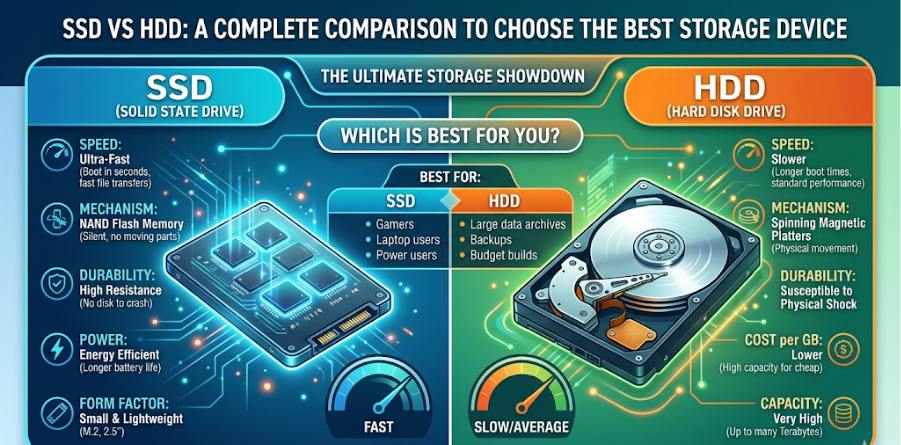
Introduction to HDD
HDD stands for Hard Disk Drive. It is a traditional storage device that has been used for decades in computers. It stores data on spinning magnetic platters and uses a mechanical arm to read and write information. Because of its long history and mature technology, HDD remains a popular choice for users who need large storage space at an affordable cost.
Introduction to SSD
SSD stands for Solid State Drive. It is a modern storage device that uses flash memory chips to store data electronically. Unlike HDDs, SSDs do not contain moving mechanical parts. This makes them faster, quieter, lighter, and more resistant to damage. SSDs are commonly used in laptops, gaming systems, and high-performance computers.
Working Technology Comparison
The main difference between SSD and HDD lies in how they operate:
- HDD: Uses spinning disks and moving read/write heads.
- SSD: Uses semiconductor memory chips for instant data access.
Because SSDs do not rely on moving parts, they can access data much more quickly than HDDs.
Speed and Performance
Speed is one of the biggest reasons many users prefer SSDs. An SSD can boot a computer in a few seconds, while an HDD may take much longer. Applications open faster, games load quicker, and file transfers happen more efficiently with SSDs.
For example:
- Windows startup is faster with SSD.
- Large software installs quicker.
- Video editing and gaming performance improve.
- Multitasking becomes smoother.
If performance is the priority, SSD is clearly the better option.
Storage Capacity
HDDs are known for offering high storage capacities at lower prices. Common HDD sizes include 1TB, 2TB, 4TB, and more. This makes them useful for storing movies, backups, and large data collections.
SSDs are also available in high capacities, but larger models are more expensive. Common SSD sizes include 256GB, 512GB, 1TB, and 2TB.
Durability and Safety
Since SSDs have no moving parts, they are more durable and shock-resistant. If a laptop is dropped accidentally, an SSD has a better chance of surviving than an HDD.
HDDs are more delicate because internal mechanical parts can be damaged by shocks, vibration, or sudden movement while operating.
Noise Level
SSDs operate silently because they contain no motors or spinning disks. HDDs can produce clicking or spinning sounds during operation. For users who prefer a quiet system, SSD is the better choice.
Power Consumption
SSDs consume less power compared to HDDs. This is especially beneficial for laptops because lower power usage increases battery life. HDDs require more energy to spin the disks continuously.
Heat Generation
HDDs often generate more heat due to moving parts and motor operation. SSDs remain cooler, helping improve system efficiency and reducing cooling requirements.
Weight and Size
SSDs are lighter and more compact than HDDs. This makes them ideal for thin laptops, tablets, and portable devices. HDDs are heavier because of metal platters and mechanical components.
Lifespan
Both SSDs and HDDs have limited lifespans, but in different ways:
- HDDs may fail due to mechanical wear over time.
- SSDs have limited write cycles, but modern SSDs last many years under normal usage.
For average users, both devices are reliable when used properly.
Cost Comparison
HDDs are less expensive than SSDs when comparing cost per gigabyte. This makes HDDs a budget-friendly solution for users who need maximum storage.
SSDs cost more, but prices have dropped significantly in recent years, making them accessible to more users.
Best Uses of HDD
HDD is ideal for:
- Storing movies, music, and photos
- Backup drives
- Budget desktop systems
- Office systems with basic needs
- Large archive storage
Best Uses of SSD
SSD is ideal for:
- Operating system installation
- Gaming PCs
- Laptops
- Video editing systems
- Fast application loading
- Professional workloads
Hybrid Solution: Best of Both Worlds
Many users combine both devices:
- SSD for Windows, applications, and games
- HDD for files, media, and backups
This setup offers both speed and large storage at a reasonable price.
Conclusion
SSD and HDD each have their own strengths. SSDs are superior in speed, efficiency, durability, and overall user experience. HDDs remain valuable because of their low cost and high storage capacity. In modern computing, SSD is considered the better primary storage device, while HDD is still useful for secondary storage and backups. The best choice depends on your budget, performance expectations, and storage needs.